Metrics explained
What each number on the board means, where it comes from and how far to trust it. Everything is measured per keyword and per market, because the same phrase can be easy in one country and hopeless in the next.
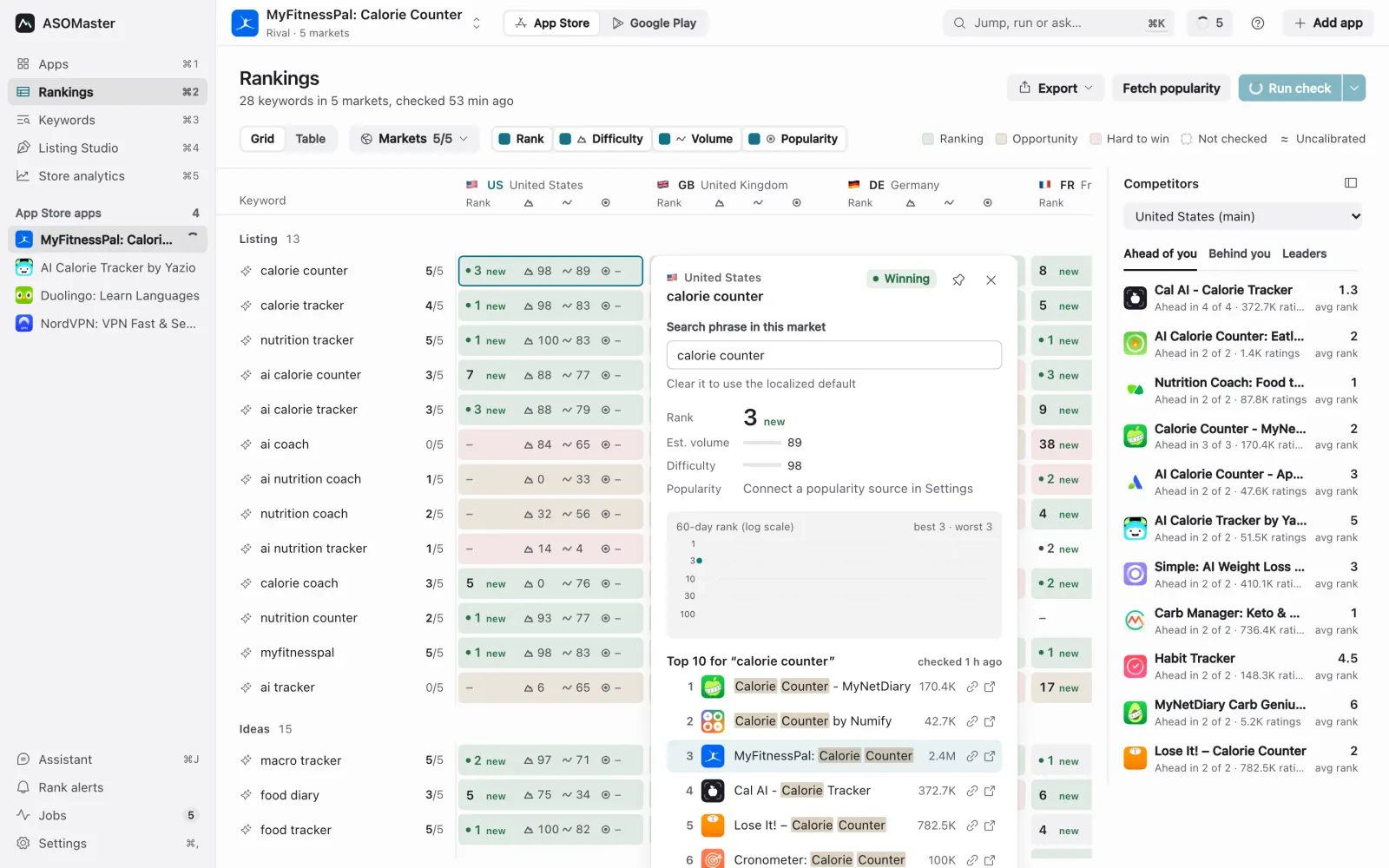
Rank and movement
Your app's position in that market's store search for the keyword's local phrase, from a live search when the check ran. Searches are cached for the day, so checking twice on the same day doesn't hit the store again unless you force it.
- A dash means your app wasn't in the results that were checked.
- The arrow and number show the change against a check at least six days older, so day-to-day noise doesn't look like a trend.
- A small green dot marks a top-3 rank.
- Rank history covers the last 60 days in charts (exports can go further back). A dashed marker shows the day you published a listing from ASOMaster, so you can read later ranks in context.
Estimated volume
A 0 to 100 estimate of how much search demand sits behind a phrase, modelled from the apps that rank for it: how well they match the phrase and how large they are. It is an ASOMaster estimate, not a count from Apple or Google, and neither store publishes one. Use it to compare phrases with each other in the same market.
Difficulty
A 0 to 100 measure of how hard it is to reach the top 10, based on the size of the apps already there. Because some stores have far fewer ratings per app than others, each market's difficulty is calibrated against the US store using apps that appear in both. A ≈ sign marks an uncalibrated difficulty: too few shared apps were found, so a default was used, and it may overstate the competition in small markets.
Real popularity
A separate 0 to 100 number from a source you connect: Apple Ads (Apple's own search popularity), Google Ads Keyword Planner (Google web searches) or an imported file. It appears with its own glyph and is never blended into the estimate. A corner notch on a cell means no popularity was available there and the verdict used the estimate. See Real popularity.
Reading a cell
| Mark | Meaning |
|---|---|
| First number, arrow | Rank and movement |
| Peak glyph | Difficulty |
| Wave glyph | Estimated volume |
| Target glyph | Real popularity |
| ≈ | Uncalibrated difficulty |
| Corner notch | No popularity here, the estimate drives the verdict |
| Accent dot | You set this market's phrase by hand |
| Faded cell | No measurable demand for this phrase here |
Visible metrics (in the Rankings toolbar and in Settings) choose which of rank, difficulty, volume and popularity a cell shows.
Verdicts and colours
Every checked cell gets one verdict. ASOMaster decides in a fixed order: first whether there is demand at all, then where you rank, then how much demand there is and how hard the phrase is. Your position counts before difficulty, so a phrase where you're already in the top 10 is never marked Tough, and a phrase nobody searches is never marked green. Demand comes from real popularity when it's available and from the estimate otherwise, each with its own thresholds.
| Colour | Verdict | Meaning |
|---|---|---|
| Green | Winning | You rank in the top 3. |
| Green | Climb | You rank 4 to 10. Push for the top 3. |
| Amber | Opportunity | Real demand and competition you can beat. |
| Amber | Consider | Modest demand. Worth it if it fits your app. |
| Red | Tough | Real demand, but the leading apps are much bigger. |
| Red | Replace | Almost no demand, and it takes space in your listing. |
| None | Drop | Almost no demand. Hide it to keep the board clean. |
| None | Unknown | The store gave too little data to judge. |
| None | Unchecked | Not checked yet. Run a check. |
Opportunity
A 0 to 100 score for how much there is to gain from targeting a phrase now. It rises with demand (real popularity weighs most when you have it), falls with difficulty, and is highest when you're within striking distance of the top rather than already there or nowhere. Sort the table or ask an agent to sort by it to find what to work on next.
Top 10 count
On a keyword row, the number of tracked markets where you rank in the top 10, out of the markets tracked. On a market card, how many of your keywords rank in the top 10 there, with the change over the last week and the keyword closest to the top 3 ("Climb next").
Market potential
A 0 to 10 score of how much a market is worth for an app on that store, with the US at 10. It combines the number of iPhone or Android users, spending power and how open the store is (markets with restricted access score lower). Each tenfold drop compared with the US costs the same number of points. Market pickers use it for the Top 5, Top 10 and Top 18 quick picks, next to the estimated users.
Reach (Listing Studio)
How much search demand a listing option covers, so you can compare drafts with each other and with your live listing. Each measured phrase counts for its demand, discounted by its difficulty, and only if all its words appear in the listing. Where they appear matters:
- App Store: a phrase covered by the name and subtitle counts fully; one that needs the keyword field counts half.
- Google Play: the title counts most, then the short description, then the full description.
Every option shows its reach, difficulty and phrases covered "vs now", and Compare lists the phrases an option newly covers or drops, with their numbers.