How to write an App Store name, subtitle and keyword field that rank
Spend your 160 searchable characters well: what goes in the App Store name, subtitle and 100-byte keyword field, with rules and a worked rewrite.
On the App Store, three fields decide which searches can find your app: the name, the subtitle and the keyword field. Together they hold about 160 characters. Everything else on your product page helps people decide to install, but it doesn't make you findable. This guide covers what each field is for, the rules Apple enforces, and how to fit your target phrases into the space, with a full before-and-after rewrite.
It assumes you already have a list of target phrases with ranks, demand and difficulty. If you don't, start with the App Store keyword research guide.
How long can the App Store name, subtitle and keyword field be?
The app name and subtitle can each be up to 30 characters, and the keyword field up to 100 bytes. Bytes matter: an English letter takes one byte, an accented letter two, and a Japanese, Chinese or Korean character three, so keyword fields in those languages hold far fewer characters.
Apple sets the name and subtitle limits in its app information reference and the keyword limit in its platform version reference:
| Field | Limit | Visible on the product page | Changes need a new version |
|---|---|---|---|
| Name | 30 characters | Yes, everywhere | Yes |
| Subtitle | 30 characters | Yes, under the name | Yes |
| Keyword field | 100 bytes | No | Yes |
A few details matter in practice:
- The keyword field is limited in bytes, not characters. For English that's the same thing. For languages that use multi-byte characters, such as Japanese, Chinese or Korean, each character takes three bytes, so you fit roughly a third as many characters.
- Each keyword must be longer than two characters, and Apple asks you not to repeat your app name or developer name there, since you're already searchable by both.
- Names of other apps and companies aren't allowed in the keyword field, and the App Review Guidelines treat misleading or keyword-stuffed metadata as grounds for rejection. Trademarks you don't own stay out of every field.
- Promotional text (170 characters) can change without a new version, but it isn't used for search. Neither is the description on the App Store.
How do the three fields work together in search?
App Store search matches individual words across the name, subtitle and keyword field and combines them, so "brown" in your subtitle and "noise" in your keyword field can rank you for "brown noise". Each word counts once wherever it sits, and the name is widely observed to carry the most weight. That has three consequences:
- Never repeat a word. A word counts once wherever you put it. Repeating "sleep" in the name and the keyword field spends characters for nothing.
- Weight differs by field. It's widely observed that the name carries the most weight, then the subtitle, then the keyword field. Put the words for your most valuable phrases higher up.
- Phrases don't need to be written out. You need the words, not the exact phrase. Word order matters less than presence, though an exact phrase in the name or subtitle tends to do better than scattered words.
Apple's own guidance on App Store search is short, but it confirms the basics: the name, subtitle and keywords are the text that search uses, and choosing them carefully matters.
Writing the name
The name has two jobs that pull against each other: it's your brand, and it's your heaviest keyword field. The usual pattern is a short brand followed by a descriptor:
- Tidepool: Sleep Sounds
- Ledgerly: Budget Planner
Guidelines that hold up:
- Keep the brand short. Every character the brand uses is one the descriptor can't. "Tidepool" is 8 characters; "Tidepool Sleep & Relaxation Studio" would leave no room.
- Put your single most valuable phrase after the brand. Pick the phrase from your research that has real demand, matches the app exactly and where you're within reach. For Tidepool that's "sleep sounds".
- Make it readable. The name appears in search results, on the home screen (shortened) and in reviews. "Tidepool: Sleep Sounds" is a name; "Tidepool Sleep Sounds Noise Rain" is a keyword list and reads like spam.
- Don't chase a word you can't win. "Sleep" alone is huge and contested. "Sleep sounds" is narrower and winnable for an app like Tidepool.
Changing the name of an established app is a bigger decision than changing the subtitle: users recognise the name, and it shows up across the store. Test descriptor changes in the subtitle first if you're unsure.
Writing the subtitle
The subtitle is visible under the name, so it has to read as a sentence fragment that sells the app. It's also your second-strongest keyword field. Good subtitles carry two or three target words that the name doesn't already cover:
- Tidepool: "Brown Noise & Bedtime Stories"
- Ledgerly: "Expense Tracker & Bills"
Tips:
- No words from the name. "Sleep Sounds for Better Sleep" wastes the subtitle.
- Use phrases from your push group. These are the phrases where you rank 11 to 30 with real demand. Moving one of them into the subtitle is one of the most reliable ways to gain positions.
- Ampersands and commas are fine. They save characters and read naturally.
- Read it aloud. If it doesn't make sense to a person who has never heard of your app, rewrite it.
How should you fill the 100-byte keyword field?
Use single words separated by commas without spaces, skip every word already in the name or subtitle, leave out your app name, category words and "app", and spend what's left on long-tail words from reviews and search suggestions. A well-filled field gets close to 100 bytes without repeating a word.
The keyword field is invisible, so it can be purely functional. The rules in detail:
- Commas, no spaces.
ocean,waves,rainuses 16 bytes.ocean, waves, rainuses 18. Over a full field the spaces cost you a whole word or two. - Single words, mostly. Because words combine across fields, "rain" plus "sounds" (already in the name) covers "rain sounds". Writing "rain sounds" in the keyword field wastes "sounds".
- No duplicates of the name or subtitle. Check every word against the two visible fields.
- Singular or plural, usually not both. Apple's matching handles many plural forms, though not all. If your measurements show you rank for both "wave" and "waves" with only one in the field, keep one.
- No category names or "app". Your category and the word "app" are not worth the bytes; people searching "sleep app" find sleep apps through "sleep".
- Use the leftovers for long tail. After your push and keep words, add specific words from reviews and suggestions: "nap", "toddler", "pink".
A quick way to check your field before you submit:
ocean,waves,fan,rain,baby,white,nature,lullaby,insomnia,nap,toddler,pink
That's 72 bytes, 12 words, no spaces, no word from "Tidepool: Sleep Sounds" or "Brown Noise & Bedtime Stories". There's room for two or three more words.
A full rewrite, step by step
Here's a complete round for Tidepool, using the measurements from its keyword research.
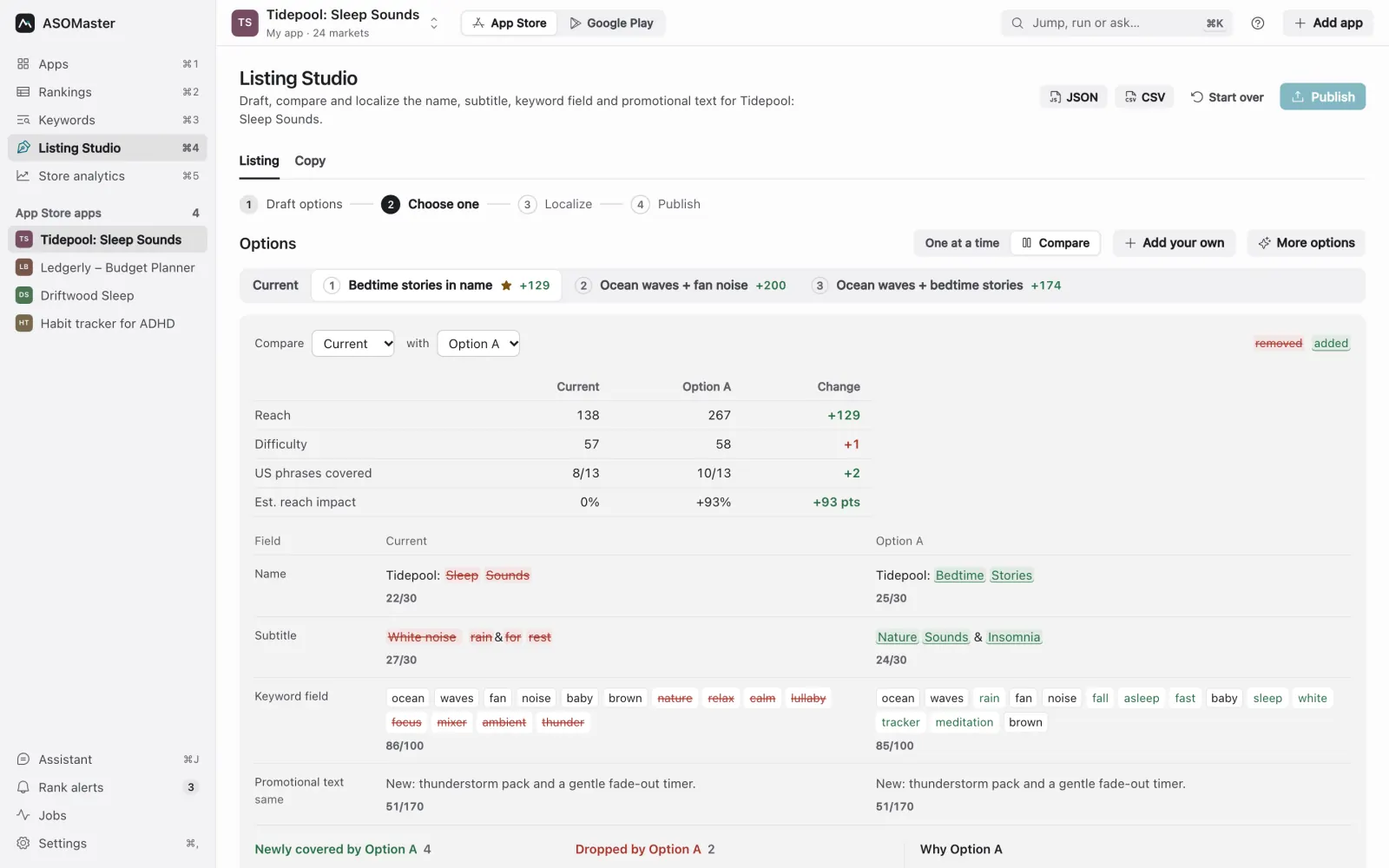
Current listing:
- Name:
Tidepool: Sleep Sounds(22/30) - Subtitle:
White noise, rain & rest(24/30) - Keywords:
ocean,waves,fan,noise,baby,brown,nature,relax,calm,lullaby,focus,mixer(70/100)
What the research said:
| Phrase | Rank (US) | Demand | Difficulty | Group |
|---|---|---|---|---|
| sleep sounds | 2 | high | 62 | keep |
| white noise | 8 | high | 37 | keep |
| ocean waves | 1 | medium | 72 | keep |
| brown noise | 24 | medium | 39 | push |
| bedtime stories | not in top 200 | medium | 89 | long shot (Tidepool has stories) |
| rain sounds | 19 | medium | 74 | push |
| relax | 120 | medium | 85 | drop |
Decisions:
- The name stays. "Sleep sounds" ranks 2 and is the app's core phrase.
- "White noise" ranks 8 from the subtitle. Moving "white" and "noise" to the keyword field is a risk to a keep phrase, so check it after release. "Brown noise" is the best push phrase, and "bedtime stories" has real demand and a matching feature but no words in the listing yet, so the subtitle is where to test both.
- "Rest", "relax", "calm" and "focus" cover nothing valuable in this niche. They go.
- "Mixer" describes a feature but nobody searches for it here. It goes.
New listing:
- Name:
Tidepool: Sleep Sounds(22/30) - Subtitle:
Brown Noise & Bedtime Stories(29/30) - Keywords:
white,ocean,waves,fan,rain,baby,nature,lullaby,insomnia,nap,toddler,pink(72/100)
Every keep phrase is still covered: "sleep sounds" by the name, "white noise" by "white" (keywords) plus "noise" (subtitle), "ocean waves" by the keyword field. The push phrases moved up: "brown noise" is now in the subtitle, "rain sounds" is covered by "rain" plus "sounds", and the long shot "bedtime stories" gets its first chance from the subtitle.
Before you submit, compare the two versions field by field and list the phrases each one covers. A side-by-side diff catches the most common mistake: removing a word that was holding a top-ten rank. In ASOMaster this is the Compare view in Listing Studio, which also lists phrases newly covered and dropped with their numbers.
Localizations are separate fields
Every localization you add in App Store Connect has its own name, subtitle and keyword field. That's extra searchable space, and in many storefronts more than one localization counts. Apple's App Store localizations reference lists, for each country, a default language and additional supported languages. The United States, for example, lists Spanish (Mexico), Chinese, French, Korean, Portuguese (Brazil), Russian, Vietnamese and Arabic as additional languages.
Many developers fill the keyword field of an additional localization (such as Spanish (Mexico) on the US store) with extra English words to gain space. Whether those words count for search in a given storefront is something to verify with rank checks rather than assume, and the localization still needs a sensible name and subtitle in that language for the people who read it. The localization guide covers how to do this properly.
Mistakes that cost rankings
- Rewriting everything at once. If you change all three fields and ranks move, you won't know which change did it. Keep your keep phrases stable and change the rest.
- Dropping a ranking word by accident. Always check old ranking phrases against the new text.
- Spaces after commas. Up to 11 wasted bytes in a full field.
- Competitor names. Against the rules and a common reason for rejection.
- Filling the subtitle with a keyword list. It's visible. It has to convince people as well as rank.
- Judging on day two. Give a change at least one to two weeks before deciding it failed.
Checklist before you submit
- Name: brand plus your most valuable winnable phrase, under 30 characters, readable.
- Subtitle: two or three new target words, no repeats from the name, reads as a sentence.
- Keyword field: commas without spaces, single words, no repeats, no competitor names, as close to 100 bytes as useful.
- Every current top-ten phrase still covered.
- Each localization filled in, in its own language, within its own byte limit.
- A note of the release date, so you can read later rank changes in context.
To check a draft before you paste it into App Store Connect, use the free App Store metadata checker. For the broader pre-release routine, see the ASO checklist before every app update. For what the numbers in your research mean, see metrics explained.