Competitor analysis for apps: find who outranks you and why
Find the apps that beat you in store search, market by market, work out why they rank, and decide which phrases you can realistically take from them.
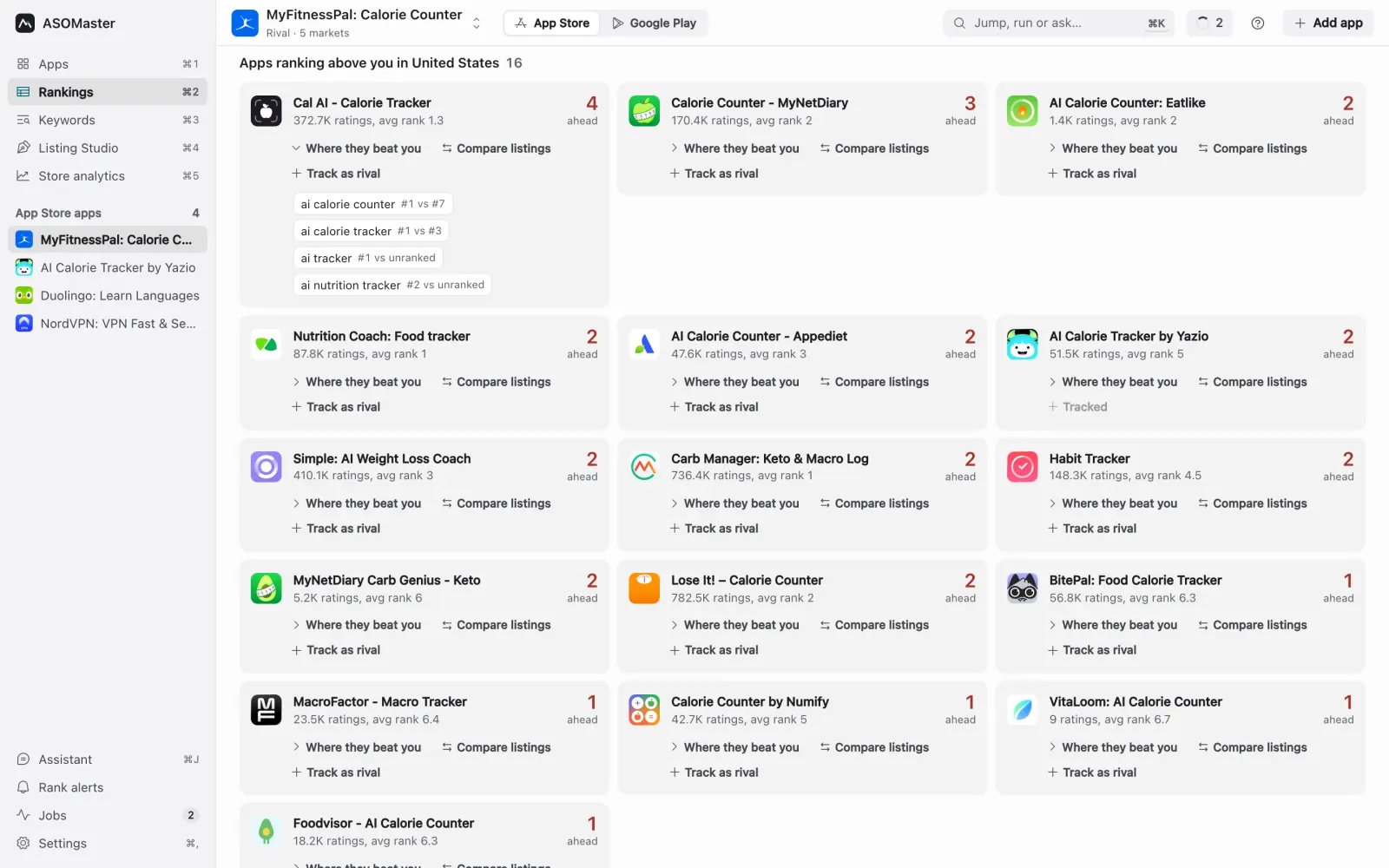
Most app teams can name their competitors. Far fewer can say which apps outrank them in search, on which phrases, in which countries. Those are rarely the same list. The app you think of as your rival may not rank for anything you target, while a small app you have never opened sits above you on six of your listing phrases in Germany.
Competitor analysis for app store search is less about studying a famous rival and more about reading the results pages you are trying to win. This guide walks through a method you can repeat each release: find who is above you, work out why they rank, and decide which phrases are realistic to take.
Step 1: define competitors by search, not by category
Start from your own phrases. For each phrase you target and each market you care about, the apps ranked above you are your competitors for that phrase. Aggregate across phrases and you get a ranked list that reflects search reality.
A useful way to score them:
- Count the phrases where an app ranks above you in a market.
- Weight phrases by demand, so beating you on a phrase with real volume counts more than beating you on a phrase nobody searches.
- Count apps listed twice on a results page only once, at their first position.
- Ignore apps that appear only once; a single overlap is noise.
What comes out is a short list per market of apps that consistently stand between you and the top ten. In ASOMaster this is the "Apps ranking above you" panel under the board: for the focused market it lists each app with its ratings, its average rank across your phrases, how many phrases it beats you on, and the exact phrases with its rank next to yours.
A worked example
Ledgerly is a fictional budget planner for iPhone and Android, tracking 14 App Store phrases in the US, UK and Germany. In Germany the panel shows:
| App | Ratings (DE) | Phrases where it beats you | Avg. rank on those |
|---|---|---|---|
| A local household-ledger app | 38K | 9 of 14 | 3.1 |
| A local budgeting app | 6.2K | 7 of 14 | 5.4 |
| A global finance app | 410K | 4 of 14 | 1.8 |
| A small savings app | 900 | 3 of 14 | 8.0 |
The famous global app beats Ledgerly on only four phrases, all generic ones like "budget" and "finanzen". The real competition in Germany is two local apps that use the German words people search, such as "haushaltsbuch" (household ledger), which Ledgerly's translated listing never mentions. That one finding is worth more than any study of the big brand's screenshots.
Step 2: read the results page for each lost phrase
For each phrase where a competitor is above you, open the results page for that market and look at the top ten as a whole. You want to answer three questions.
Does the phrase match their metadata? Check whether the phrase, or all of its words, appear in the competitor's name or subtitle (App Store) or title and short description (Google Play). Apps that match the phrase in high-weight fields rank on it for a reason you can replicate. Apps that rank without matching it usually rank on strength: ratings, installs and the store's sense that people looking for this find them useful.
How established are they? Look at rating counts relative to yours and to the market. A top ten where most apps have tens of thousands of ratings is a wall. A top ten with a few weak apps at positions 6 to 10 is a door.
Is the intent the same as yours? If the phrase is "budget" and the top ten is full of banking apps, your planner may never be the best result, however well you write the subtitle.
In ASOMaster the keyword detail for one cell shows exactly this: the market's top apps with position and rating count, whether the phrase matches their title or subtitle, your own position, and the rank history.
Step 3: classify every lost phrase
With the results page in front of you, put each phrase into one of four groups. Keep the list short.
- Metadata gap. Competitors above you match the phrase in their name or subtitle and you do not, and their rating counts are within reach. Fix: put the phrase into a high-weight field in your next version. These are your best wins.
- Strength gap. Competitors match the phrase and you do too, but they have far more ratings or installs. Metadata will not close this quickly. Fix: work on conversion (screenshots, ratings prompts) and keep the phrase if it is core to the product.
- Wrong wording. You target a phrase that locals do not use. Competitors win with a different, local phrasing. Fix: switch to the phrase people type. Our guide to localizing app keywords covers how to find it.
- Wrong intent. The results serve a different need. Fix: drop the phrase, or move it to the keyword field if it costs nothing.
For Ledgerly's nine lost phrases in Germany, the classification looks like this:
| Phrase (DE) | Group | Next step |
|---|---|---|
| haushaltsbuch | Metadata gap | Put it in the German subtitle |
| haushaltsbuch app | Metadata gap | Covered by the same subtitle change |
| ausgaben tracker | Metadata gap | Keyword field |
| budget planer | Strength gap | Keep, work on ratings |
| finanzen | Wrong intent | Drop |
| budget | Strength gap | Keep in keyword field only |
| geld sparen | Wrong wording | Test "sparen app" instead |
| kosten übersicht | Metadata gap | Keyword field |
| konto | Wrong intent | Drop |
Five of nine are fixable in one release. Two should be dropped, which frees characters for the fixes.
Step 4: compare listings side by side
Once you know which phrases a competitor wins through metadata, put their name and subtitle next to yours and look at the words, not the design.
- Shared words show the core vocabulary of the niche. If every app above you uses "haushaltsbuch", the market has told you what it searches.
- Words only they use are candidates for your own fields, if they describe your product truthfully.
- Words only you use are either your differentiation or wasted characters. Check them against the board: if a word only you use does not appear in any phrase with demand, it is probably costing you.
ASOMaster's "Compare listings" puts your name and subtitle next to a rival's with shared and unique words highlighted, so you can do this in a minute per competitor. Never copy a competitor's text. You are looking for the vocabulary of the market, not their sentences, and store guidelines prohibit using other apps' names in your metadata (App Review Guidelines, section 2.3.7).
Step 5: track the important rivals over time
A one-off analysis goes stale quickly. Competitors ship updates, change subtitles and run campaigns. Pick the two or three apps that beat you most often and track them as projects of their own. You then see their rank history on the same phrases, their live listing text, and when it changed.
Two signals are worth watching:
- A rival jumps on several of your phrases at once. Usually a listing change. Read their new name and subtitle.
- A rival drops out of the top ten across a market. An opening. If you were at 11 to 15 on those phrases, a check after their drop tells you whether you moved up.
Rank alerts help here. Set alerts for top-three and top-ten moves on your own app, and you will see the effect of a rival's change on you even before you look at them. ASOMaster can send these as a desktop notification, to a Slack channel or by email.
Why run competitor analysis per market?
Because the competition changes by country. Local apps often win outside the US with local wording, a global app can lead in one country and be absent in the next, and rating counts differ so much that 5,000 ratings make an app a giant in one market and invisible in another. One US analysis rarely holds everywhere.
Run steps 1 to 3 for each market where you have demand. With 18 markets that sounds like a lot of work, but the panel and the per-market board make it a matter of minutes per market, and an agent can do the first pass for you (see AI agents and MCP for ASO).
What can't competitor analysis tell you?
It shows what competitors rank for, not why the store ranks them. Install velocity, conversion and retention are invisible from outside, App Store keyword fields are hidden, paid campaigns can lift organic ranks for a while, and matching a rival's words removes one reason you aren't shown without guaranteeing their rank. In detail:
- You can see what competitors rank for, not why the store ranks them. Install velocity, conversion rate and retention are invisible from outside.
- You cannot see their keyword field on the App Store. You can infer it from phrases they rank on without matching their name or subtitle, but inference is all it is.
- Paid campaigns can lift a competitor's organic rank temporarily. A sudden jump is not always a metadata change.
- Matching a competitor's words does not guarantee matching their rank. It removes one reason you are not shown.
How do you repeat competitor analysis each release?
Per market, list the apps above you on two or more phrases, read each lost phrase's top ten, classify the gap, compare listings word by word with your two or three main rivals, change at most three high-weight words, and read the before and after once the release is live. As a checklist:
- Per market, list the apps ranking above you on two or more of your phrases, weighted by demand.
- For each lost phrase, read the top ten: metadata match, rating strength, intent.
- Classify: metadata gap, strength gap, wrong wording, wrong intent.
- Compare listings word by word with the two or three most frequent rivals.
- Change at most three high-weight words per release; drop phrases with the wrong intent.
- Track your main rivals as projects and set rank alerts for your own app.
- Read the before and after per market once the release is live.
The keyword rank tracker shows the rival panel, keyword detail and listing comparison for every market you track. For how to read the difficulty and volume numbers that feed this analysis, see keyword difficulty and search volume, and for turning findings into fields, writing an App Store name, subtitle and keyword field.