App store optimization: a practical guide for the App Store and Google Play
How store search works on each platform, how to pick keywords, what to write in each field, and how to measure whether it worked, as a routine an indie developer can keep up.
What is app store optimization?
App store optimization (ASO) is the work of making an app easier to find in the App Store and Google Play, and more likely to be downloaded once someone finds it. Most installs of a small app start with a search inside the store, so the words in your listing decide which searches you can appear for at all, and the icon, screenshots and ratings decide whether people tap.
ASO has two halves. Discoverability is about store search: choosing the phrases people type and placing them in the fields each store reads. Conversion is about the product page: getting the people who see your app to install it. Both feed each other. An app that converts well tends to rank better over time, and a well-ranked app with a weak page wastes its position.
Nobody outside Apple and Google knows the exact ranking formulas. What you can know is which fields are searchable, what people search in each market, how strong the apps ranking for it are, and where you rank today. Good ASO works from those measurements and changes one thing at a time.
How do App Store and Google Play search differ?
The two stores read different text. Apple says App Store search uses your app name, subtitle and keyword field, among other signals (Apple's search guidance). Google says the text on your listing helps people discover your app (Get discovered on Google Play search), and Google Play has no hidden keyword field.
| Field | Limit | Searchable? |
|---|---|---|
| App Store | ||
| App name | 30 characters | Yes, weighs most |
| Subtitle | 30 characters | Yes |
| Keyword field | 100 bytes, comma separated, never shown | Yes |
| Promotional text | 170 characters | No |
| Description | 4,000 characters | No |
| Google Play | ||
| App title | 30 characters | Yes, weighs most |
| Short description | 80 characters | Yes |
| Full description | 4,000 characters | Yes |
On both stores your developer name is searchable too, and both weigh signals you can't type: downloads, ratings, engagement and quality. The practical difference is where keywords live. On the App Store, keyword work happens in about 160 characters per localization, and the description is written for people. On Google Play, the description is part of search, so it has to mention your main phrases naturally, a few times, without turning into a list.
Name, subtitle and keyword field changes on the App Store go live with a new app version; promotional text can change at any time. On Google Play you can change the listing without a new build. The guides to the App Store name, subtitle and keyword field and to Google Play titles and descriptions cover each store in detail.
How do you research keywords?
Keyword research turns "what is my app for" into a short list of phrases worth the space. The keyword research guide walks through a full round; the outline is:
- Describe the app in the user's words. Write what someone would type when they need it, not your feature names. A white noise app is "sleep sounds" before it is "ambient audio engine".
- Build a seed list from your own description, store autocomplete, the names and subtitles of the apps that rank for your main phrase, and your reviews.
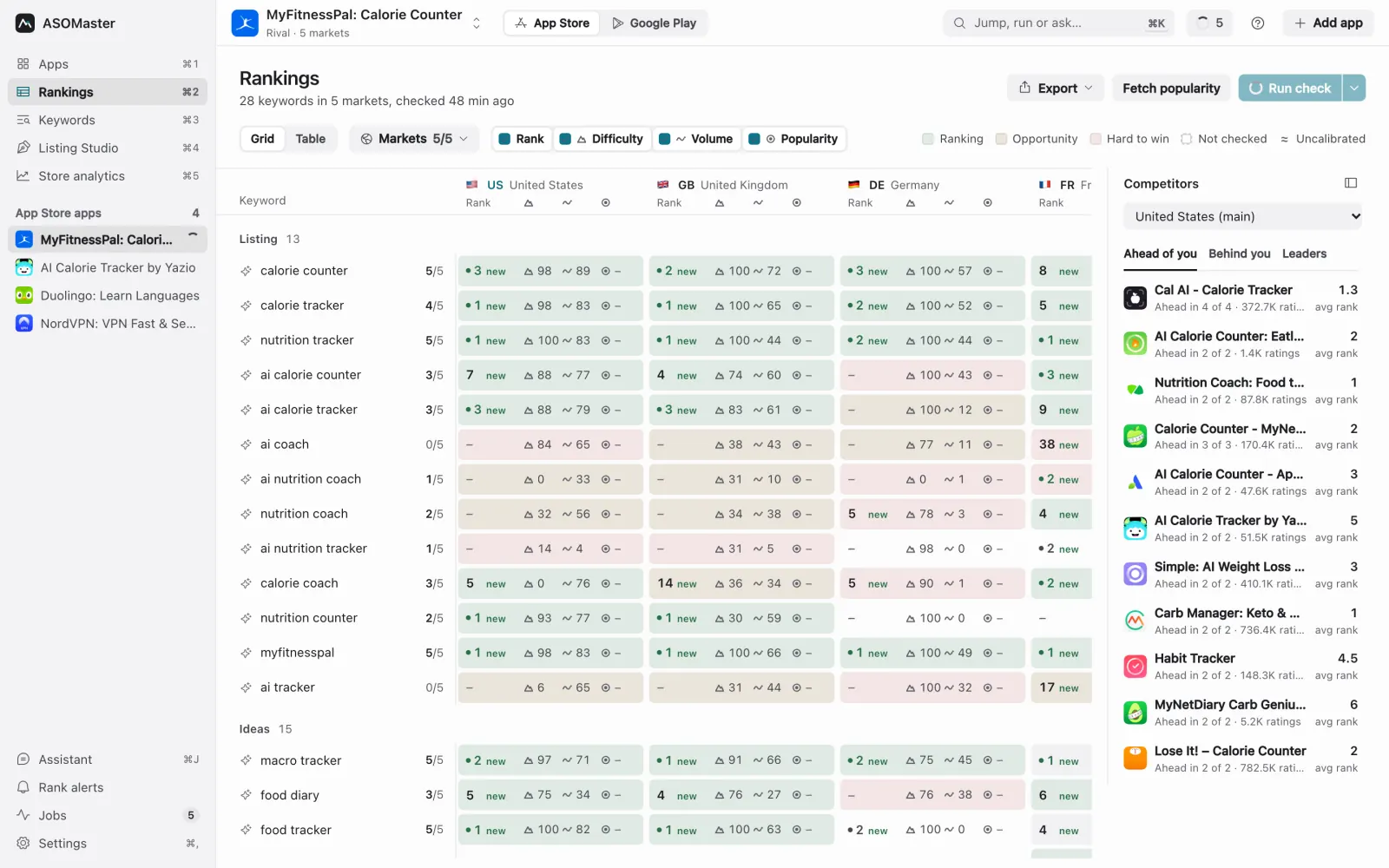
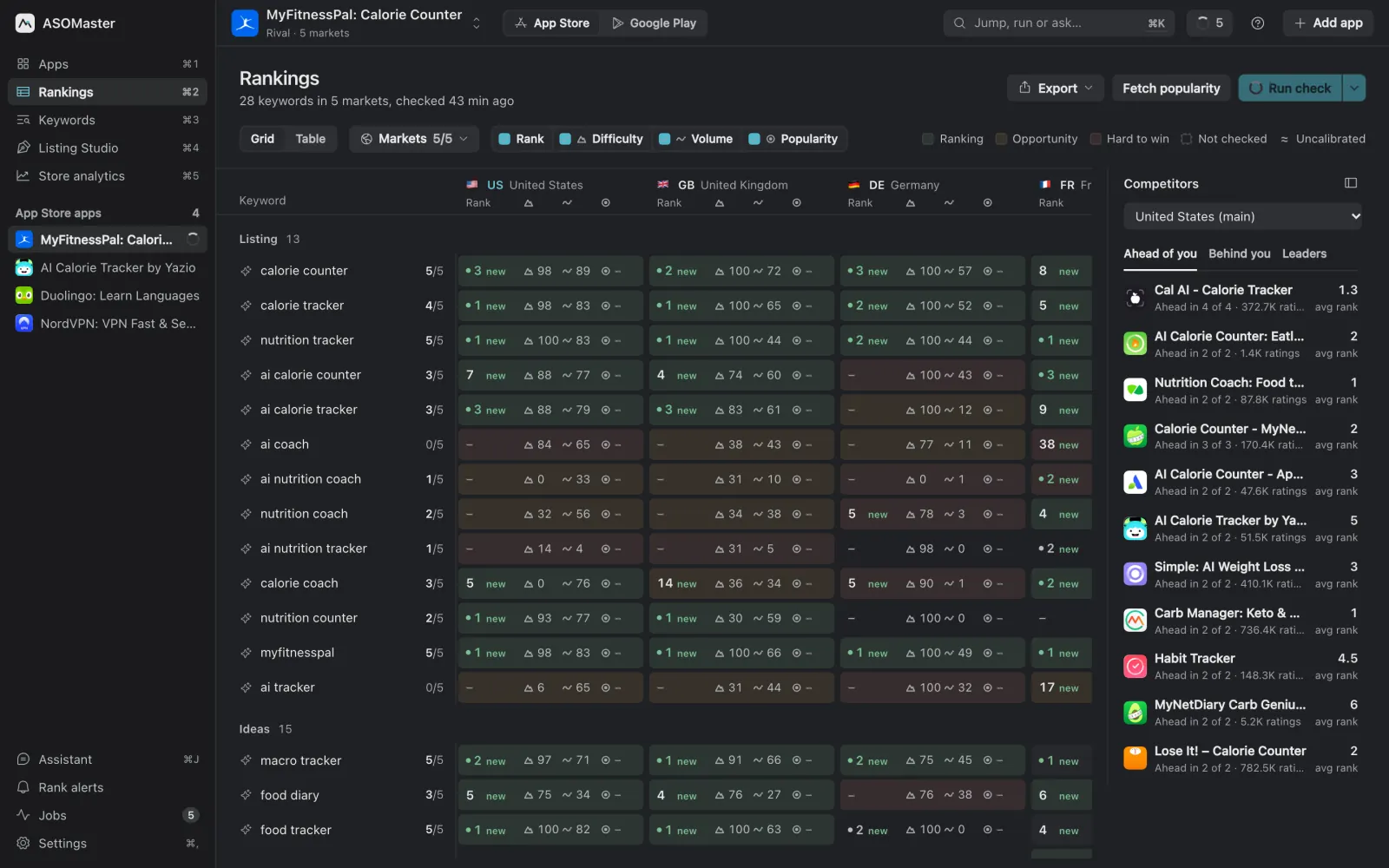
- Check where you rank today for each phrase, in each market you care about.
- Measure demand and difficulty. Demand says how many people search a phrase; difficulty says how strong the apps already ranking for it are.
- Sort the list into phrases to target now, phrases to grow into, phrases to keep where you already rank, and phrases to drop.
Volume against difficulty
The highest-volume phrase is rarely the right first target. If the top 10 for "screen mirroring" are apps with tens of thousands of ratings, a new app won't reach the first page for it, and rank 40 brings almost no installs. A phrase with half the demand and beatable competition can bring more. Read volume and difficulty together, and read them per market: the same phrase can be hard in the US and open in the Netherlands.
Know where each number comes from. Apple Ads shows search popularity as a 1–5 level in its interface; the finer score available through the API is a relative 1–100 index, not a search count. Google Ads Keyword Planner measures web searches, not Play searches. Most ASO tools, ASOMaster included, also estimate volume from the store's own search results. Use real data where you have it and treat estimates as estimates. Keyword difficulty and search volume explains how to combine them, and Metrics explained shows how ASOMaster calculates its own.
The long tail
Longer, more specific phrases ("white noise for babies", "airplay receiver android") have less demand each but far fewer strong competitors, and the people who type them know what they want. A new app usually wins its first top-10 ranks on two- and three-word phrases, then climbs toward the broad ones as ratings and downloads grow. On the App Store you rarely need to write the long phrase out: the store combines words across the name, subtitle and keyword field, so "white" in the name and "noise,baby" in the keyword field can cover "white noise baby".
Research each country separately
Every storefront has its own search results and its own language habits. People in Germany search "weißes Rauschen", not "white noise"; in some markets the English phrase is what people type even though the store is in another language. Research the markets that matter for your app one by one, in their language, instead of translating your English list. Validating an app idea uses the same per-market numbers before you build.
How do you write the listing for each store?
App Store: name, subtitle and keyword field
- Name (30 characters): your brand plus the most valuable phrase you can credibly own, for example "Tidepool: Sleep Sounds". It weighs most, so spend it on your best phrase, not a slogan.
- Subtitle (30 characters): the second phrase, written for people, since it shows under your name in search results. Don't repeat words from the name.
- Keyword field (100 bytes): single words separated by commas without spaces. Leave out words already in the name or subtitle, category words and "app". Accented letters take two bytes and Chinese, Japanese and Korean characters three, so a Japanese field holds about 33 characters.
- Rules: no other apps' names or trademarks you don't own, and nothing misleading or stuffed with keywords. The App Review Guidelines treat both as grounds for rejection.
Paste a draft into the free App Store metadata checker to count characters and bytes and catch repeated words.
Google Play: title, short description and full description
- Title (30 characters): brand plus your main phrase, no emoji, no ALL CAPS unless it is your brand, and no "best", "#1", "free" or "sale" (Google Play's metadata policy).
- Short description (80 characters): one sentence that holds your second and third phrases and says why someone should install.
- Full description (4,000 characters): written for people, with your core phrases a few times each across the text, in headings and the first lines. No keyword lists, no unattributed testimonials.
The free Google Play listing checker counts each field and how often your phrases appear.
Should you localize for every market?
Localize where there is demand you can win. Each App Store localization and each Google Play language has its own fields, so every language you add is new searchable space. A dictionary translation often ranks for nothing, because people don't search the dictionary word. Find the phrase locals type, check it in that market's store, and write the localized name, subtitle and keywords around it. Localizing app keywords covers the method, including how some App Store countries list more than one supported language.
Start with the markets that are large for your category and where the English listing already gets some downloads. Localize the screenshots' headings too: a German listing with English screenshots converts worse than one that reads German all the way down. The localization tool page shows how ASOMaster tests local candidates per store.
How do screenshots and the icon affect downloads?
In search results people see your icon, name, rating and often your first screenshots (plus the subtitle on the App Store) before they decide to open your page. That is where conversion starts.
- Icon: simple, recognisable at small sizes, distinct from the apps around you in search.
- First screenshots: the first two or three carry most of the weight. Show the main outcome with a short heading, not the settings screen. The App Store takes up to 10 screenshots per device size; Google Play takes up to 8 per device type.
- Match the search: if you target "sleep sounds", the first screenshot should show sleep sounds.
- Test: App Store product page optimization tests up to three treatments of your icon, screenshots and preview videos against your original page; Google Play store listing experiments test graphics and descriptions. Give a test enough traffic before reading it.
The screenshot generator renders device-framed screenshots with headings in every listing language at each store's exact sizes.
How much do ratings matter?
Ratings affect both halves of ASO. The average shows in search results and on your page, so it affects conversion directly, and the number of ratings is one of the clearest signals of how established an app is, which is why difficulty measures look at the rating counts of the apps ranking for a phrase.
- Ask at a good moment, after the user has succeeded at something, with the platform's own prompt. On iOS the system shows it at most three times in 365 days; Google Play's in-app review API has a quota too, so don't call it on every launch.
- Answer reviews, especially the critical ones. Both stores let you reply, and people read the replies.
- Watch ratings per market: a bad localization or a regional bug shows up as falling ratings in one country first.
How do you measure ASO?
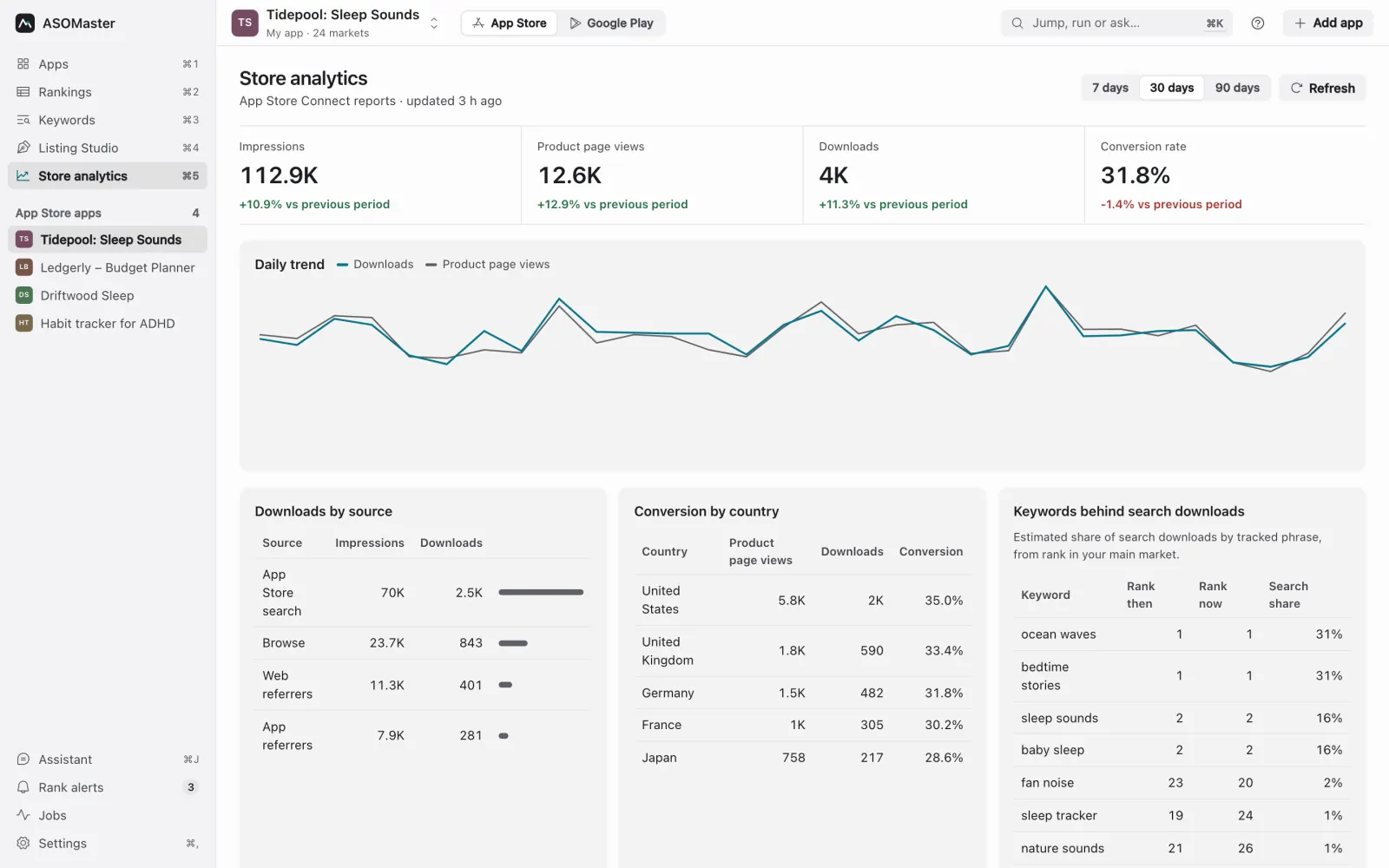
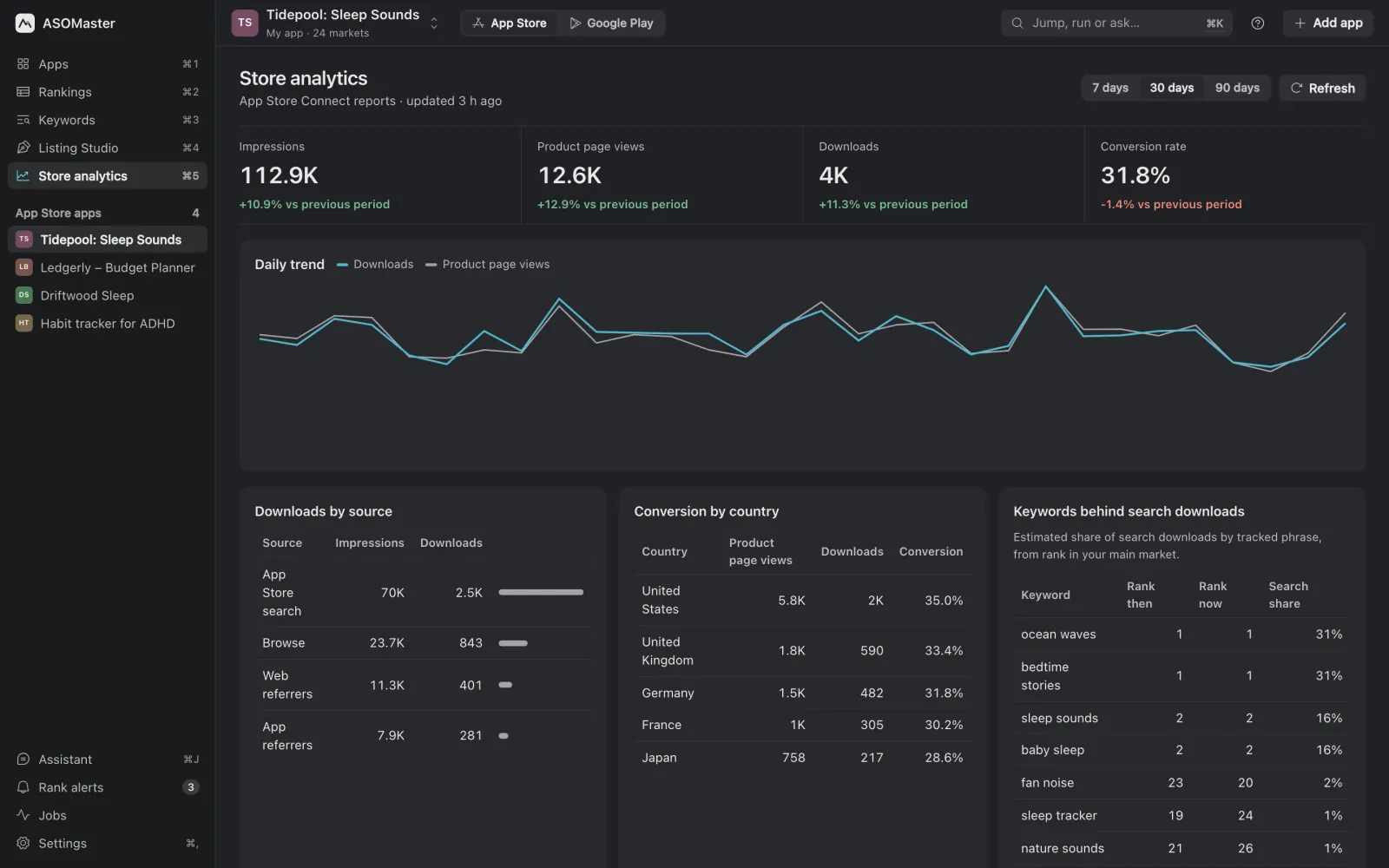
Two sets of numbers tell you whether a change worked. Ranks per keyword per market tell you whether you are found. Store analytics tell you what happens next: impressions (how often your app was shown), product page views, downloads, and the conversion rate between them. App Store Connect shows these by source and territory; Play Console shows store listing visitors, acquisitions and conversion by country.
Read them as a funnel. More impressions with flat downloads means you are found for phrases that bring the wrong people, or your first screenshots don't match the search. More page views but low conversion points at the page. Ranks that rise in the US and fall in Germany point at the German listing. Compare the same weekdays before and after a release, wait at least a full week, and read again at two and four weeks; ranks wobble for days after a change.
What does a weekly ASO routine look like?
ASO rewards steady, small changes more than one big rewrite. A routine that fits in an hour a week:
- Monday: check ranks for every tracked phrase in every market and note what moved into or out of the top 10.
- Look at rivals: who passed you, and did anyone change their name or subtitle?
- Read the funnel: impressions, page views and conversion for last week against the week before.
- Add three to five new phrases to test, from autocomplete, reviews or rivals' listings, and drop the ones that show no demand.
- Before each release, pick at most three phrases to move and draft the name, subtitle and keyword field (or title and short description) around them. Run the ASO checklist before every app update.
- After the release, write one paragraph: what changed, what moved, what to try next.
For a real starting point, the ScreenDock case study shows one app's baseline across 18 markets and the plan that came out of it.
What are the most common ASO mistakes?
- Chasing the biggest phrase. Rank 60 for a huge phrase is worth less than rank 5 for a modest one.
- Translating instead of localizing. A literal translation can have no searches at all.
- Repeating words across fields. On the App Store a word counts once; repeating it in the keyword field wastes bytes.
- Changing everything at once. When the name, subtitle, keywords and screenshots all change in one release, you can't tell which change helped.
- Reading one day or one market. Ranks move daily and differ by country. Compare weeks, per market.
- Keyword lists and other apps' names. Both stores reject them, and on Google Play a stuffed description reads badly to the people you want to convert.
- Mixing estimates with real data. An estimated volume and an Apple Ads popularity score are different numbers; know which one you are looking at.
- Forgetting the page. Better ranks with screenshots that don't match the search just show more people a page they skip.
Which tools help?
You can do ASO with a spreadsheet, the stores' own consoles and a lot of manual searching. A tool saves the searching and keeps the history. ASOMaster is our desktop app for it: a keyword tracker for 54 App Store and 53 Google Play markets in each market's language, an audit that scores each market and lists the fixes, Listing Studio for drafts measured against your live listing, a local pricing tool, store analytics and an MCP server for AI agents. For a wider comparison, including cloud suites, see the best ASO tools and competitor analysis for apps for the rival side of the routine.